If you’re an advanced user seeking a hardware wallet that supports passphrases for maximum security, you’ve come to the right place. The Trezor Safe 3 stands out for its robust security features and secure element integration, making it a top overall choice. For those prioritizing connectivity and a user-friendly interface, the Trezor Safe 7 offers Bluetooth and a touchscreen, though it comes with a higher cost. The Ledger Nano X remains popular for its Bluetooth capabilities and extensive app support, but it might lack some advanced features of dedicated passphrase management. Continue reading for a detailed comparison to help you find the best fit for your security needs and workflow.

Get smart everyday buys delivered free with Prime
- Fast, free delivery on millions of items
- Prime Video, Amazon Music and more included
- Member-only deals all year
Key Takeaways
- The best wallets in this roundup support passphrase protection and emphasize advanced security features like secure elements.
- Bluetooth connectivity varies, with some models prioritizing wireless convenience at the expense of increased attack surface.
- Touchscreen interfaces are a common upgrade for ease of use, but they can add to the wallet’s complexity and cost.
- Premium options like Ledger STAX provide portfolio-building tools, but may be overkill for pure security-focused use.
- All selected wallets are designed for users with technical knowledge, making setup and management more involved than beginner options.
| Trezor Safe 3 – Passphrase & Secure Element Protected Crypto Hardware Wallet | 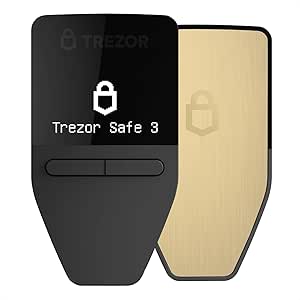 | Best Overall for Advanced Security and Transparency | Secure Element: EAL6+ certified | Display: Bright OLED | Interface: Two-button pad | VIEW ON AMAZON | See Our Full Breakdown |
| Trezor Safe 7 – Crypto Hardware Wallet with Bluetooth, Color Touchscreen, Secure Element, Quantum-Ready |  | Best for Wireless Convenience and High-End Features | Chip Architecture: Dual-chip (TROPIC01 and Secure Element) | Security: Quantum-ready, EAL6+ Secure Element | Display: High-resolution color touchscreen | VIEW ON AMAZON | See Our Full Breakdown |
| Ledger Nano X – Classic Crypto Wallet with Bluetooth | 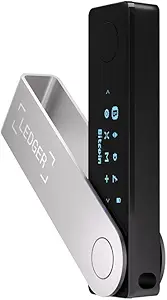 | Best for Mobile Compatibility and Broad Support | Connectivity: Bluetooth | Compatibility: iOS | Supported Coins: 15,000+ coins & tokens | VIEW ON AMAZON | See Our Full Breakdown |
| Ledger Nano Gen5 Crypto Wallet – Secure Digital Asset Management – Black |  | Best for Detailed Asset Management and Offline Security | Device Type: Hardware Wallet | Color: Black | Screen Size: 2.8 inches | VIEW ON AMAZON | See Our Full Breakdown |
| Ledger STAX – Premium Crypto Wallet – Securely Build Your Portfolio |  | Best for Portfolio Management and NFT Support | Screen: 3.7” curved E Ink | Asset Support: 15,000+ cryptocurrencies and NFTs | Security: PIN, Ledger Recovery Key | VIEW ON AMAZON | See Our Full Breakdown |
| Trezor Safe 5 Crypto Hardware Wallet with Secure Element & Touchscreen |  | Best for Comprehensive Security and User Experience | Secure Element: EAL 6+ NDA-free Secure Element | Display: Gorilla Glass touchscreen | Supported Coins: Supports thousands of coins and tokens | VIEW ON AMAZON | See Our Full Breakdown |
| hardware wallet for advanced users with passphrase | Connectivity | Display |
|---|---|---|
| Trezor Safe 3 | — | Bright OLED |
| Trezor Safe 7 | Bluetooth, USB-C | High-resolution color touchscreen |
| Ledger Nano X | Bluetooth | — |
| Ledger Nano Gen5 Crypto Wallet | — | — |
| Ledger STAX | Pair with Ledger Wallet app | — |
| Trezor Safe 5 Crypto Hardware | USB-C | Gorilla Glass touchscreen |
More Details on Our Top Picks
Trezor Safe 3 – Passphrase & Secure Element Protected Crypto Hardware Wallet
The Trezor Safe 3 stands out for its high-security features, including a certified secure element and open-source design, making it ideal for users who prioritize transparency alongside passphrase protection. Compared to the Ledger Nano Gen5, it offers a more transparent security model but lacks some of the advanced screen and connectivity options found in the Ledger Nano X. Its user-friendly OLED display simplifies verification, yet it demands a certain familiarity with hardware wallets. The open-source approach boosts trust but could be overwhelming for users new to crypto security. This pick suits advanced users who value open-source transparency and certified security, but may not appeal to those seeking wireless convenience or a more plug-and-play experience.Pros:- High-security with EAL6+ certified secure element
- Open-source design enhances transparency and trust
- Bright OLED display for easy transaction verification
- Supports multiple authentication methods including passphrases
Cons:- Requires familiarity with hardware wallets and security concepts
- Limited info on battery life and connectivity options
Best for: Advanced crypto enthusiasts who want transparent security and strong passphrase features
Not ideal for: Beginners seeking a simple, plug-and-play hardware wallet or those who prefer wireless features
- Secure Element:EAL6+ certified
- Display:Bright OLED
- Interface:Two-button pad
- Protection:PIN & passphrase enabled
- Open-source:Yes
- Standards:FIDO2
Our verdict“This device is best suited for users who prioritize open-source transparency and robust security over convenience features.”
Trezor Safe 7 – Crypto Hardware Wallet with Bluetooth, Color Touchscreen, Secure Element, Quantum-Ready
The Trezor Safe 7 excels with its large, high-resolution color touchscreen and wireless connectivity, making it a strong choice for those who want easy management on the go. Its quantum-ready secure element and dual-chip architecture provide advanced protection against emerging threats, surpassing the security features of the Safe 3. However, the premium build and wireless setup might be costly and potentially less appealing to security purists wary of Bluetooth vulnerabilities. The Qi2-compatible wireless charging adds convenience but may raise concerns about attack vectors. This model suits tech-savvy users who want premium features and wireless flexibility, but might be overkill for those preferring wired-only, simpler setups.Pros:- Quantum-ready secure element and dual-chip architecture
- High-resolution color touchscreen for effortless navigation
- Wireless management with Bluetooth and Qi2 charging
- Robust build with reinforced glass and anodized aluminum
Cons:- Premium price point may be prohibitive for some users
- Bluetooth setup could introduce security concerns
- Limited info on battery duration
Best for: Advanced users who need wireless management and high-end security features
Not ideal for: Users concerned about Bluetooth security or those on a tight budget
- Chip Architecture:Dual-chip (TROPIC01 and Secure Element)
- Security:Quantum-ready, EAL6+ Secure Element
- Display:High-resolution color touchscreen
- Wireless Charging:Qi2-compatible
- Connectivity:Bluetooth, USB-C
- Battery:LiFePO₄
Our verdict“This device is ideal for advanced users seeking premium features and wireless ease of use, accepting a higher price and potential security considerations.”
Ledger Nano X – Classic Crypto Wallet with Bluetooth
The Ledger Nano X is a widely used choice, supporting over 15,000 cryptocurrencies with Bluetooth connectivity for mobile convenience. It offers a straightforward experience for managing a large portfolio, but its reliance on Bluetooth may concern security-conscious users who prefer wired-only solutions. Compared to the Ledger Nano Gen5, it provides more mobility and a familiar interface, though it sacrifices some security granularity and is more prone to physical damage due to its plastic casing. Its long battery life ensures usability during extended sessions, but it’s not as feature-rich in display or biometric options. This pick is best for active crypto traders and users who want a balance of broad asset support and wireless convenience, but less so for those seeking maximum security or open-source transparency.Pros:- Supports over 15,000 cryptocurrencies and tokens
- Wireless Bluetooth connectivity for mobile use
- Compatible with iOS devices
- Long-lasting battery for extended sessions
Cons:- Bluetooth introduces potential security concerns
- Color may vary slightly from images
- Limited to hardware wallet functionalities without advanced security features
Best for: Crypto users managing many assets who need mobile access and Bluetooth support
Not ideal for: Security-focused users wary of wireless vulnerabilities or those who prefer open-source firmware
- Connectivity:Bluetooth
- Compatibility:iOS
- Supported Coins:15,000+ coins & tokens
- Battery Life:Hours of use
Our verdict“This wallet is well-suited for active users who prioritize wide asset support and mobile convenience, accepting some security tradeoffs.”
Ledger Nano Gen5 Crypto Wallet – Secure Digital Asset Management – Black
The Ledger Nano Gen5 offers a high-quality touchscreen and robust security features, including a secure element and offline backup options. It’s an excellent choice for users who want detailed management across multiple devices, but its reliance on a physical device can be cumbersome for quick transactions. Compared with the Nano X, it lacks Bluetooth, making it more secure but less flexible for mobile use. The 2.8-inch touchscreen simplifies navigation, yet some users might find it complex if they aren’t familiar with crypto wallets. This device emphasizes security and multi-asset management for advanced users willing to handle a slightly more involved setup. This wallet suits experienced users seeking detailed control and offline security, but isn’t ideal for casual or on-the-go traders.Pros:- Secure Element and PIN protection ensure high security
- Large 2.8-inch touchscreen for easy management
- Supports multiple digital assets and accounts
- Offline backup options for recovery
Cons:- Requires physical device for access, no cloud or remote options
- Setup can be complex for users new to hardware wallets
- Less suited for quick, on-the-fly transactions
Best for: Experienced crypto holders needing detailed management and strong offline security
Not ideal for: Beginners or users who prefer wireless or quick-access solutions
- Device Type:Hardware Wallet
- Color:Black
- Screen Size:2.8 inches
- Security Features:Secure Element, PIN, Ledger Recovery Key
- Compatibility:Multiple assets, Ledger Wallet app
Our verdict“This wallet is best for users with significant assets who want detailed control and offline security, accepting a more involved setup process.”
Ledger STAX – Premium Crypto Wallet – Securely Build Your Portfolio
The Ledger STAX caters to high-end users looking to manage extensive portfolios across multiple chains, supported by its curved E Ink touchscreen and PIN protection. Its emphasis on NFT management and seamless integration with the Ledger app sets it apart from other models, like the Nano X, by offering a more refined interface for digital collectibles. However, its premium price and reliance on the Ledger ecosystem may deter casual users or those preferring open-source solutions. The high-resolution curved E Ink display provides clear visibility for managing diverse assets, but the device’s complexity may be intimidating for newcomers. This model is best for seasoned collectors and portfolio managers who want a dedicated, premium device for large-scale crypto and NFT management.Pros:- Secure PIN protection and Ledger Recovery Key
- High-resolution curved E Ink touchscreen for easy navigation
- Supports over 15,000 cryptocurrencies and NFTs
- Offline security with seamless Ledger app integration
Cons:- High price point may be a barrier for casual users
- Requires familiarity with Ledger’s ecosystem and management tools
- Limited to Ledger ecosystem, less flexible for other platforms
Best for: Crypto investors with diverse assets and NFTs seeking a premium and dedicated device
Not ideal for: Casual users or those new to crypto management who prefer simple, lower-cost devices
- Screen:3.7” curved E Ink
- Asset Support:15,000+ cryptocurrencies and NFTs
- Security:PIN, Ledger Recovery Key
- Connectivity:Pair with Ledger Wallet app
Our verdict“This device is ideal for serious portfolio builders and NFT collectors who want a premium, dedicated hardware wallet for extensive asset management.”
Trezor Safe 5 Crypto Hardware Wallet with Secure Element & Touchscreen
The Trezor Safe 5 stands out for its combination of advanced security features and intuitive design, making it particularly well-suited for users managing a large portfolio of cryptocurrencies. Its EAL 6+ NDA-free Secure Element ensures robust protection against hardware attacks, surpassing the security level of some competitors like the Ledger Nano X, which relies on a slightly less advanced secure element. The large Gorilla Glass touchscreen paired with tactile haptic feedback provides a smooth, user-friendly interface, easing navigation during setup and daily management. Support for thousands of coins and tokens makes it versatile, especially for users who hold diverse assets. However, the absence of pricing information can make assessing value difficult, and the requirement for familiarity with crypto wallets might pose a learning curve for some. Compared with the Ledger Nano Gen5, the Safe 5 offers a more intuitive interface, but at the expense of potentially higher complexity for first-time users. This pick makes the most sense for advanced users who want maximum security without sacrificing ease of use, and who are comfortable with setup processes.
Pros:- High security with an EAL 6+ Secure Element for serious threat protection
- Large, vibrant touchscreen with tactile feedback simplifies navigation
- Supports a vast range of coins and tokens, ideal for diverse portfolios
Cons:- Lack of clear pricing information complicates value assessment
- Requires familiarity with crypto wallet setup, potentially intimidating for new users
Best for: Crypto enthusiasts managing extensive, diverse portfolios who prioritize security and user experience.
Not ideal for: Beginners or users seeking a budget-friendly or plug-and-play solution without a learning curve.
- Secure Element:EAL 6+ NDA-free Secure Element
- Display:Gorilla Glass touchscreen
- Supported Coins:Supports thousands of coins and tokens
- Features:Passphrase support, haptic feedback, quick setup
- Form Factor:Portable, durable design
- Connectivity:USB-C
- Battery:None (powered via USB)
- Security Certifications:FIDO, Common Criteria
Our verdict“The Trezor Safe 5 is best suited for advanced users who want a secure, feature-rich device with an easy-to-use interface, provided they are comfortable with initial setup complexity.”
How We Picked
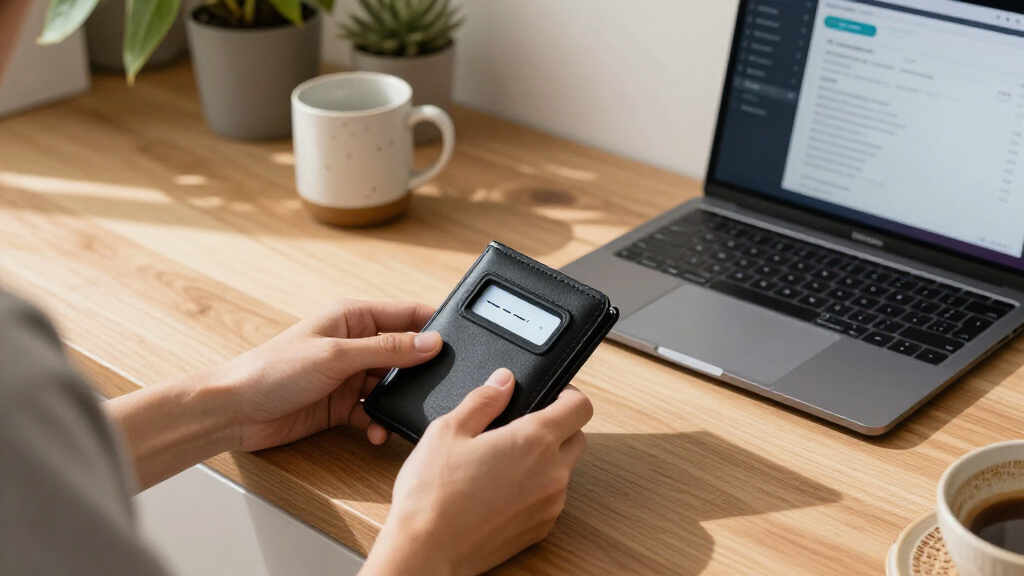
These hardware wallets were selected based on their support for passphrase features, security architecture, and suitability for advanced users. We prioritized products that incorporate secure elements or dedicated security chips, along with flexible passphrase management. Usability was also a key factor, especially for users who require more control and customization, such as touchscreen interfaces or secure connectivity options. Cost was considered in relation to features offered, ensuring each product provides value for its intended audience. The ranking reflects a balance of security, usability, and advanced features tailored to experienced users who demand more than basic cold storage.| hardware wallet for advanced users with passphrase | Display | Connectivity |
|---|---|---|
| Trezor Safe 3 | Bright OLED | — |
| Trezor Safe 7 | High-resolution color touchscreen | Bluetooth, USB-C |
| Ledger Nano X | — | Bluetooth |
| Ledger Nano Gen5 Crypto Wallet | — | — |
| Ledger STAX | — | Pair with Ledger Wallet app |
| Trezor Safe 5 Crypto Hardware | Gorilla Glass touchscreen | USB-C |
Factors to Consider When Choosing Hardware Wallet For Advanced Users With Passphrase
Choosing a hardware wallet for advanced users with passphrase support involves weighing several important factors. While security is paramount, ease of use, connectivity options, and future-proof features like quantum resistance also matter. Understanding these considerations can help you avoid common pitfalls—such as neglecting secure element quality or overlooking device compatibility. This guide highlights key aspects to evaluate before making your decision, ensuring you select a wallet that aligns with your technical needs and security expectations.Security Architecture and Secure Elements
For advanced users, the security architecture of a wallet is critical. Devices with dedicated secure elements or chips provide a higher level of protection against physical attacks and firmware tampering. Avoid wallets that rely solely on software security or less robust hardware, as these can be more vulnerable. Consider whether the device supports features like firmware signing, secure boot, and multi-layer encryption, which are vital for maintaining the integrity of your assets in high-stakes environments.
Passphrase and Backup Management
Effective passphrase support is a must for this category, but it’s equally important how the device handles backup and recovery. Look for wallets that allow for multiple passphrases, easy backup procedures, and straightforward recovery options. Beware of models that complicate passphrase setup or lack clear instructions; these can increase the risk of loss or misconfiguration. A well-designed passphrase system should integrate seamlessly with your existing security practices without adding unnecessary complexity.
Connectivity and User Interface
Wireless features like Bluetooth can enhance convenience but also introduce potential attack vectors. Advanced users should weigh the tradeoff between ease of access and attack surface. Touchscreens are common on premium models, aiding in complex operations like passphrase entry or device configuration, but they can also be less durable. Wired connections, such as USB-C, remain the most secure and reliable option, especially for critical transactions requiring maximum security. Choose a device that balances your comfort with security best practices.
Future-Proofing and Compatibility
Cryptocurrency and security landscapes evolve rapidly. A good wallet should support emerging standards like quantum resistance, or at least be adaptable through firmware updates. Compatibility with multiple cryptocurrencies and operating systems ensures you can manage diverse assets without hassle. Avoid devices that lock you into proprietary ecosystems or lack ongoing support, as these can limit your control and increase long-term risks.
Cost and Value Considerations
While premium devices offer advanced features, they also come at higher prices. Balance your budget against the security and usability features you need. For purely security-focused operations, investing in a device with a secure element and robust passphrase support makes sense. If your needs are more casual, a less expensive model might suffice, but always ensure it does not compromise core security principles. Remember, in high-value environments, paying more upfront can prevent costly breaches later.
Frequently Asked Questions
Can I use a passphrase with any hardware wallet?
Most advanced hardware wallets support passphrase features, but implementation can vary. Some devices integrate passphrases directly into their setup process, while others require manual configuration. It’s important to verify that the wallet explicitly mentions support for passphrases in its specifications and user guides. Using a wallet without robust passphrase support can expose your assets to increased risk if the device is compromised or lost, so choosing one with clear, secure passphrase capabilities is essential for advanced security practices.
How does a secure element improve security for passphrase use?
A secure element is a dedicated chip designed to resist physical tampering and hardware attacks. When used in hardware wallets, it isolates sensitive data such as private keys and passphrases from other parts of the device, greatly reducing the risk of extraction. For advanced users, this means a higher level of protection against sophisticated attacks, especially in scenarios where physical access to the device is possible. Devices with secure elements are generally more reliable for managing complex passphrase configurations without compromising security.
Is Bluetooth connectivity safe for passphrase management?
Bluetooth connectivity offers convenience but can introduce additional security challenges. When properly implemented with strong encryption and authentication, it can be safe for routine use. However, for the highest security environments, wired connections are preferable because they eliminate wireless attack vectors. If you choose a Bluetooth-enabled device, ensure it uses current security standards and keep firmware updated. For truly sensitive operations, consider disabling wireless features or opting for a wired connection to minimize risk.
What should I do if my device’s firmware is compromised?
If you suspect firmware compromise, stop using the device immediately. Most reputable hardware wallets offer a way to perform firmware reinstallation or reset, but this process can be complex. Always verify firmware authenticity through official channels and avoid unofficial updates, which could be malicious. Regularly updating firmware from trusted sources is essential, and maintaining secure backups of your seed phrase and passphrases ensures you can restore your assets if needed. In extreme cases, replacing the device might be the safest option.
Are premium wallets worth the extra investment for advanced security?
Premium wallets typically offer enhanced features such as secure elements, touchscreen interfaces, and more robust build quality, which can justify the higher cost for advanced users. These features facilitate complex passphrase management and provide better physical and digital security. However, they might also introduce additional complexity or require a learning curve. For users managing large assets or requiring maximum security, the investment often translates into greater peace of mind. For casual or smaller-scale use, a less expensive model with core passphrase support may be sufficient.
Conclusion
For those prioritizing overall security and robust passphrase support, the Trezor Safe 3 makes an excellent choice. If connectivity and user experience matter most, the Trezor Safe 7 offers a compelling package, though at a higher price point. The Ledger Nano X balances familiarity with practical features, suited for users who need Bluetooth but are comfortable with a slightly less advanced security architecture. Budget-conscious users seeking strong security might prefer a model like the Ledger Nano Gen5, while those building a comprehensive portfolio may find the Ledger STAX ideal. Beginners should consider starting with simpler, well-supported options, while advanced users should focus on secure elements and passphrase flexibility to ensure maximum protection.
Halloween Picks
halloween
As an affiliate, we earn on qualifying purchases.