

This checklist is for DIY investors who want a clearer way to organize portfolio records, evaluate investments, and keep important documents accessible. It covers both practical tools and habits that support consistent portfolio management.

Get smart everyday buys delivered free with Prime
- Fast, free delivery on millions of items
- Prime Video, Amazon Music and more included
- Member-only deals all year
The sections follow a working order: keep an investment ledger, consult a portfolio guide, assess stocks with a valuation workbook, and use tools to calculate, scan, and secure records. Some slots offer advice rather than a product pick, so you can adapt them to your preferred workflow.
Use each section to identify the job you need done before choosing a tool. Check that the format fits your routine, confirm compatibility with your existing devices and files, and keep clear, current records as your portfolio changes.
Investment Ledger
An investment ledger gives you one place to record portfolio activity and review what you own. The useful version is the one you can keep current: decide which details matter to your process, such as holdings, transaction dates, quantities, and notes, then update them consistently. Reliable records make it easier to follow your own decisions over time.
A common mistake is to create an elaborate tracking system and then stop maintaining it. Start with a format you will actually revisit, whether that is a spreadsheet, a notebook, or another tool you already use. Avoid duplicating records across several places unless you have a clear reason; inconsistent entries can make later reviews harder. Keep the workflow simple enough to sustain.
Before settling on a format, consider how you access records, whether you need to review them on more than one device, and how you will preserve older entries. Choose fields that match your investing approach, and make sure dates and identifiers are recorded consistently. Review the ledger on a regular schedule and reconcile it with the records you rely on. Consistency matters more than complexity.
What to look for:
- A format you can update regularly
- Fields that match your investing workflow
- Consistent dates and holding identifiers
- A practical way to preserve older entries
- Easy access during portfolio reviews
Portfolio Tax Guide
A guide can help you plan when to review investing records and what questions to bring to your tax preparation process. The listed pick, “Investment Planner: A 365-Day Guide to Investing and Portfolio Managem,” is identified as an investment planner; the product name alone does not establish its specific contents or tax coverage. Treat it as a possible organizing aid and check the scope before relying on it for tax-related decisions.
A common buying mistake is assuming that a planner covers every situation or replaces personalized tax guidance. Review the available description and sample pages, if provided, to see whether its structure suits your needs. Consider whether it supports the schedule and recordkeeping habits you want. Do not infer tax advice, jurisdiction coverage, or included worksheets from the title alone. Verify what it actually includes.
Fit matters here too: choose a format you can use throughout the year, and decide where related statements and notes will live. If you prefer digital records, check whether the planner’s format works with your devices; if you prefer paper, consider where you will store it alongside supporting documents. Keep it connected to your own records, and consult a qualified professional for questions that depend on your circumstances. Use the guide as a planning aid.
What to look for:
- A clear description of the planner’s contents
- A format that fits your recordkeeping habits
- A schedule you can follow through the year
- Compatibility with your paper or digital workflow
- Clear limits on what guidance it provides
Investment Planner: A 365-Day Guide to Investing and Portfolio Management

A planner for tracking and organizing investments across stocks, bonds, real estate, and other assets. It is designed to support investment planning and portfolio management throughout the year.
Pros:
- Supports year-round investment planning
- Covers multiple investment types
- Combines investment tracking with portfolio management
Cons:
- No additional product details are provided
Best for: Investors seeking a structured planning companion
Not ideal for: Anyone expecting unverified, personalized tax guidance
Bottom line: Check the planner’s actual scope and use it alongside your own records.
Stock Valuation Workbook
A valuation workbook gives you a repeatable place to document how you assess a company. The goal is not to make a decision for you; it is to record assumptions, inputs, and questions so that you can revisit your reasoning later. A consistent process can make comparisons across companies easier to follow.
A common mistake is treating a workbook output as precise simply because it is expressed numerically. Assumptions and source data shape the result, so note where figures come from and when you recorded them. Avoid copying a template without understanding its inputs, and do not compare results produced with materially different assumptions as though they were directly equivalent. Make assumptions visible.
Choose a workbook format that works with your devices and your comfort with formulas. If using a spreadsheet, check that formulas are understandable and that you can inspect or change inputs without breaking the structure. If using paper, leave enough room to explain your reasoning and update it later. Organize entries consistently, save dated versions when useful, and revisit the analysis when your information or assumptions change. Prioritize clarity and traceability.
What to look for:
- Inputs and assumptions that are clearly labeled
- Sources and dates for recorded figures
- A format compatible with your devices
- Formulas you can inspect and understand
- Space to record reasoning and revisions
Financial Calculator
The HP Prime G2 Graphing Calculator with Color Touch Display, CAS, and Exa is the listed pick for calculations in this checklist. A dedicated calculator can fit a workflow that involves entering values directly and working away from a spreadsheet. Before choosing it, confirm that its functions match the calculations you need; the product name alone does not establish every capability or compatibility detail. Match the tool to your tasks.
A common mistake is buying a specialized calculator without checking how you will use it day to day. Think through whether you prefer physical keys, a touch display, or spreadsheet formulas, and whether the calculator will be used at a desk or carried between locations. Review the manufacturer’s specifications for supported functions, charging or power needs, and any relevant connection options. Check the details that affect your routine.
Consider how this calculator fits with your existing devices and records. If you expect to move results into a spreadsheet or document, verify the available transfer options rather than assuming direct compatibility. Check the display and controls in product information or in person if those affect accessibility or comfort. A calculator is most useful when you can enter values accurately and repeat your work, so keep notes about inputs and methods with the results. Make calculations reproducible.
What to look for:
- Functions that match your calculation needs
- Manufacturer specifications for power and connectivity
- Controls and display suited to your preferences
- A practical way to record inputs and results
- Compatibility with your existing workflow
HP Prime G2 Graphing Calculator with Color Touch Display, CAS, and Exam Approval

The HP Prime G2 is a programmable graphing calculator featuring a 3.5-inch multi-touch color display, advanced graphing, and CAS capabilities. It is exam-approved for standardized tests like SAT, IB, and AP, and includes wireless connectivity and expandable memory for classroom use.
Pros:
- Large high-resolution multi-touch color display for interactive graphing
- Exam-approved for standardized tests, suitable for various math courses
- Wireless connectivity and app integration enhance classroom collaboration
- Expandable memory for storing programs and images
Cons:
- Complex features may require a learning curve for new users
- Higher price point compared to basic calculators
- Battery life may vary with extensive use
Best for: Investors who prefer a standalone calculator
Not ideal for: People who handle all calculations in existing spreadsheets
Bottom line: Confirm the calculator’s functions and workflow fit before making it part of your process.
Document Scanner
The ScanSnap iX2500 Wireless or USB High-Speed Document Scanner, Black is the listed pick for turning paper records into digital files. A scanner can help bring statements and other portfolio documents into a consistent filing routine. Confirm the device’s actual features and supported systems from its product information; the name alone does not establish operating system support, included software, or connection details. Verify compatibility first.
A common mistake is choosing a scanner based only on a speed description while overlooking the way documents are fed, saved, and retrieved. Consider the kinds of pages you handle, how often you scan, and whether your workflow includes multipage documents. Check supported paper sizes, connection options, and software requirements. If you expect to scan sensitive financial paperwork, decide where files will be stored and who can access them. Plan the full document workflow.
Think about the scanner’s footprint and where it will sit, especially if desk space is limited. Confirm that your computer or mobile devices can use the scanner as intended, and check whether wireless or USB connections suit your setup. Establish a naming and folder system before digitizing a large backlog, so files remain findable. Keep original documents when you need them, and make sure your digital filing routine includes appropriate backups. Organize files as you scan.
What to look for:
- Supported devices and operating systems
- Connection options that suit your setup
- Paper sizes and document handling details
- Software and file formats that fit your workflow
- A storage and backup plan for scanned records
ScanSnap iX2500 Wireless or USB High-Speed Document Scanner, Black

The ScanSnap iX2500 is a high-speed document scanner with double-sided scanning, a 100-sheet feeder, and Wi-Fi 6 or USB-C connectivity. Its touchscreen supports personalized profiles, while automatic optimization and file organization help manage documents, receipts, photos, and business cards.
Pros:
- Fast double-sided scanning
- Large 100-sheet document feeder
- Wireless and USB-C connectivity
- Automatic file optimization and organization
Cons:
- Availability can vary
Best for: Investors organizing paper statements as digital files
Not ideal for: People without compatible devices or a file storage routine
Bottom line: Check system support and plan where scanned records will live before digitizing documents.
Locking File Box
The Aluminum Alloy Portable Document Case File Box with Locking Security a is the listed pick for storing paper documents. A dedicated case can give important records a defined place and make them easier to gather when needed. The product name indicates a locking feature, but does not establish its dimensions, lock mechanism, or level of protection. Confirm the details before relying on it.
A common mistake is assuming that a lock alone addresses every storage need. Check the case’s internal dimensions against the documents, folders, or envelopes you plan to keep inside, and verify whether it accommodates them without bending. Review how the lock works and whether keys or other access items fit your routine. Also consider how much space the case takes up and whether its handle or overall form suits the place you intend to store it. Fit and access matter.
Think about which records belong in the case and how you will keep them organized. Dividers, labeled folders, or an index can make retrieval easier, but confirm any included organization features rather than assuming they come with the product. Store the case where you can access it when needed, and decide who should be able to open it. For documents you may need quickly, keep a clear inventory and consider maintaining appropriate digital copies. Make important records easy to find.
What to look for:
- Internal dimensions that fit your documents
- Lock details and a manageable access process
- A size that suits the intended storage location
- Organization features confirmed by the listing
- A plan for indexing and backing up important records
Aluminum Alloy Portable Document Case File Box with Locking Security and Telesco
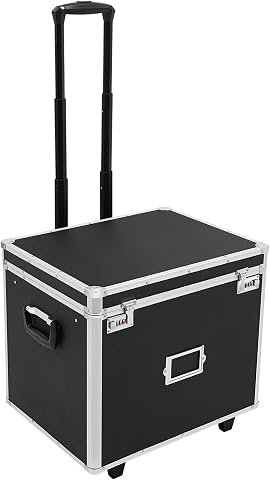
This durable aluminum alloy file box offers a stylish and organized storage solution for documents, notebooks, and office supplies. It features lockable security, large capacity, and easy mobility with wheels and a telescopic handle, making it ideal for office, home, or bank use.
Pros:
- Sturdy and corrosion-resistant aluminum alloy construction
- Secure locking system to protect valuables
- Large capacity with organized storage features
- Easy to transport with wheels and telescopic handle
Cons:
- Heavy for some users at 12 lbs
- Limited color options
- No mention of waterproof features
Best for: Investors who want a designated case for documents
Not ideal for: People needing verified protection specifications the listing does not provide
Bottom line: Verify capacity and lock details, then organize the records you store inside.
Build the checklist in the order that helps you stay organized: establish a ledger, choose a planning guide or valuation format that suits your process, then add calculation and document tools where they solve a real need. Start with the essentials for your workflow and confirm product details before buying. Prioritize the habits first.
Portfolio management becomes easier to revisit when records are orderly and your methods are clear. Choose tools you will use consistently, keep assumptions and documents findable, and adjust the checklist as your needs change. A steady routine is a strong foundation.
Halloween Picks
halloween
As an affiliate, we earn on qualifying purchases.